

We’ve all experienced that moment of panic when the power flickers and our computer screen goes dark. A reliable UPS battery backup is designed to prevent exactly this scenario, giving us precious minutes to save work and shut down safely. However, like all protective devices, these systems can sometimes develop issues. At Aokly, we believe that understanding how to identify and address common problems with your UPS battery backup can save you time, money, and potential data loss. Here is a practical guide to troubleshooting the most frequent challenges users encounter.
Recognizing the Warning Signs of a Failing Unit
The first step in troubleshooting is knowing what to look for. Your UPS battery backup will often communicate its condition through audible and visual cues. If you hear a constant, steady beeping that persists even when the utility power is normal, this is usually a clear indicator that something is wrong internally. Another common sign is the unit failing to hold a load during a power event. For instance, if your equipment shuts down immediately after a power outage, rather than running for the expected several minutes, the internal batteries are likely exhausted. Additionally, pay attention to any unusual smells or excessive heat emanating from the unit. A properly functioning UPS battery backup should run cool and quiet under normal conditions. Recognizing these warning signs early allows you to take corrective action before a complete failure occurs.
Addressing Runtime Issues and Battery Degradation
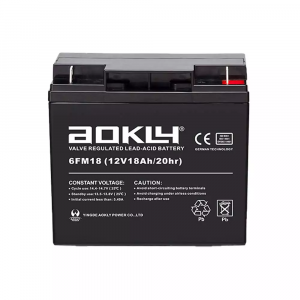
By far, the most frequent complaint we encounter involves reduced runtime. When a UPS battery backup begins to last only a few moments instead of the ten or fifteen minutes it once provided, the culprit is almost always battery age. All sealed lead-acid batteries have a finite service life, typically three to five years depending on usage and environmental conditions. Heat is a particular enemy of these batteries, accelerating chemical breakdown. If your unit lives in a warm server closet or near other heat-generating equipment, its capacity will degrade faster. To address this, first perform a self-test if your unit has this feature. If the test indicates the UPS battery backup needs replacement, you have two options. Many enterprise-level units allow for user-replaceable battery packs. For smaller units, replacement might be more cost-effective. Regular testing every three months helps you track this gradual decline and plan for maintenance proactively.
Dealing with Connectivity and Load Management Problems
Sometimes the issue is not with the batteries themselves, but with what is connected to them. A common mistake is overloading the UPS battery backup. Every unit has a maximum wattage or VA rating. If you plug too many devices into it, especially laser printers which draw enormous power during warm-up, the system may go into overload protection mode and shut down. Always check the specifications of your unit and ensure the total connected load does not exceed eighty percent of its rated capacity. Another modern issue involves communication. Many UPS units connect to computers via USB to safely shut down operating systems. If this automatic shutdown is not working, check your cable connections and ensure the monitoring software is properly installed and running. Resetting the connection or reinstalling drivers often resolves this. By carefully managing the load on your UPS battery backup and verifying its communication links, you ensure the system can perform its primary function when needed.
Keeping Your Protection Reliable
A UPS battery backup is an investment in the continuity of your work and the safety of your equipment. By paying attention to its alerts, understanding the natural limitations of battery chemistry, and managing connected devices wisely, you can extend the useful life of your system significantly. Regular inspection and timely replacement of worn components keep this silent sentinel ready for action. When you need a dependable partner to guard against power interruptions, remember that Aokly is here to provide solutions that keep your world running smoothly, even when the grid does not.
